前提知识
NoneBot2:一个跨平台的 Python 聊天机器人框架
Pallas-Bot:一框交互式的聊天机器人插件
Dice:一款 QQ 跑团掷骰机器人插件
灵感来源
得益于溯洄大佬在论坛上提供的一键式Dice!部署脚本,很多没有编程基础的人也可以在自己的设备上部署自己的骰娘 [^1]。利用批处理脚本来替代用户执行特定操作,这是一种非常巧妙的方法。那么有没有可能,这种脚本也能同样用于其他的聊天机器人上呢?
解读脚本
在开始工作之前,最好先提前了解一下它的实现方式。
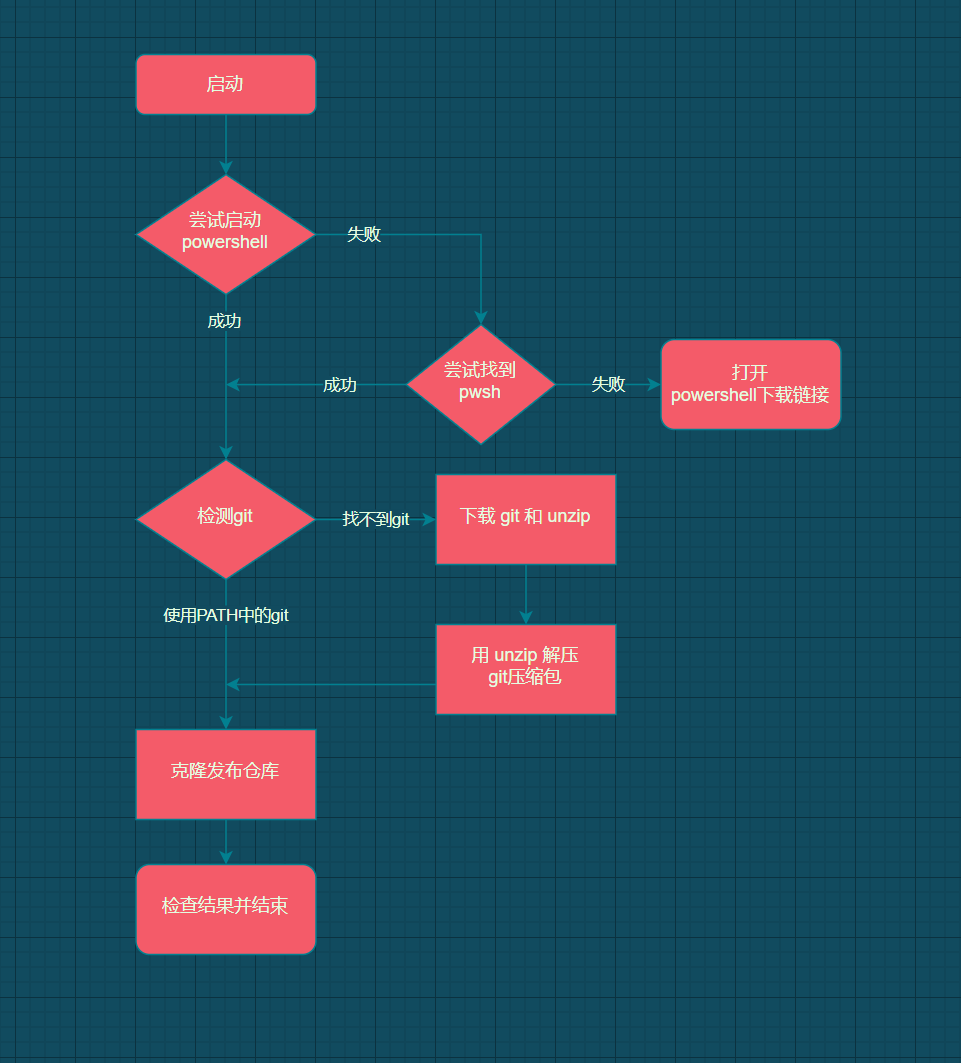
首先,用户在论坛的导航页下载OneClickMiraiDice.cmd,然后启动脚本,让批处理脚本来代替用户完成部署操作。

部署完成后,目录下的PowerShell脚本即main.ps1是整个结构的核心,而同时生成的多个批处理脚本则负责用不同的启动参数来拉起main.ps1。(其中的 bash 脚本是供 linux 用户使用的)
按需修改
我直接开抄!
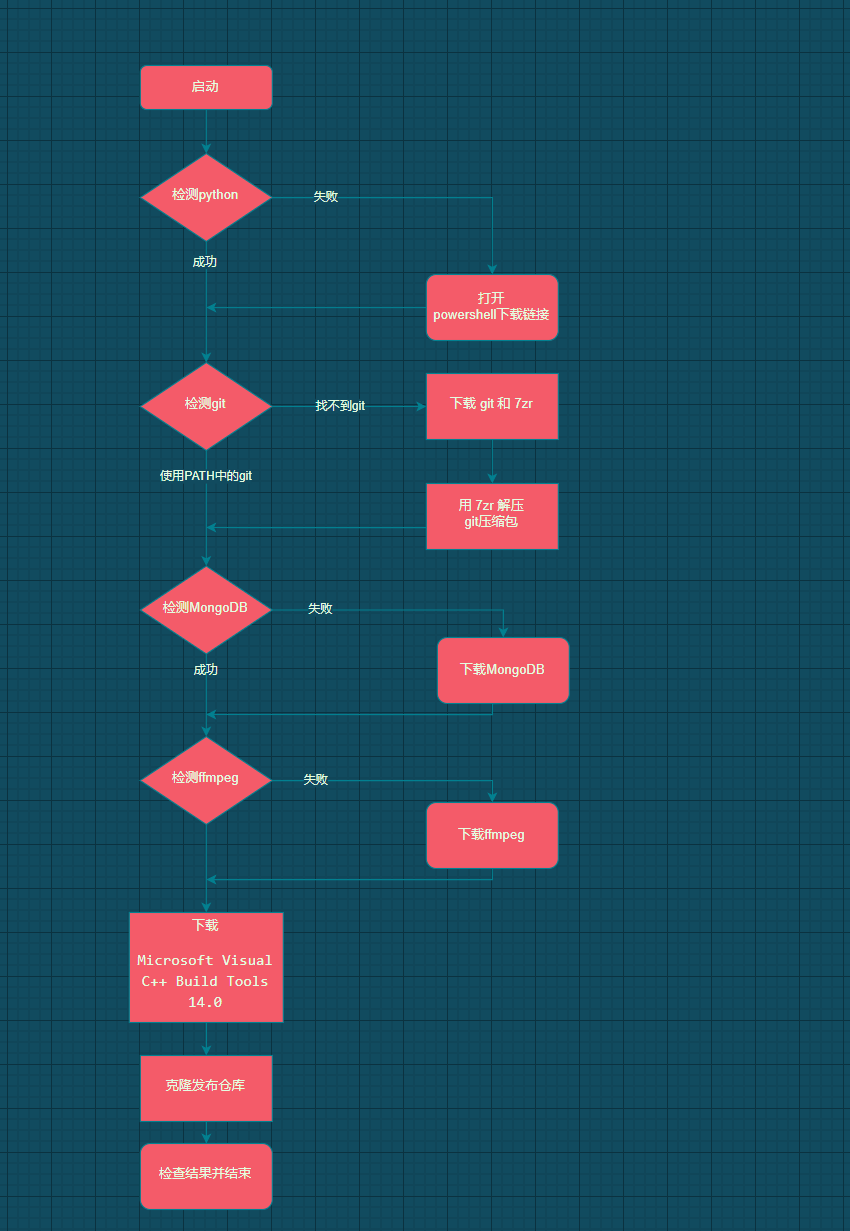
OneClickMiraiDice.cmd中原本下载的git和unzip均来自溯洄本人的OSS,现在改成了从镜像站点下载。
虽然早就听说溯洄大佬为了提高在部分机型上的兼容性,特地用Windows API来代替许多已有的轮子。但是看到这个下载脚本的时候都还是被震惊到了的。
1
2
3
4
5
6
7
8
9
10
11
12
13
14
15
16
17
18
19
20
21
22
23
24
25
| function DownloadFile($url, $targetFile)
{
$uri = New-Object "System.Uri" "$url"
$request = [System.Net.HttpWebRequest]::Create($uri)
$request.set_Timeout(15000)
$response = $request.GetResponse()
$totalLength = [System.Math]::Floor($response.get_ContentLength()/1024)
$responseStream = $response.GetResponseStream()
$targetStream = New-Object -TypeName System.IO.FileStream -ArgumentList $targetFile, Create
$buffer = new-object byte[] 256KB
$count = $responseStream.Read($buffer,0,$buffer.length)
$downloadedBytes = $count
while ($count -gt 0)
{
$targetStream.Write($buffer, 0, $count)
$count = $responseStream.Read($buffer,0,$buffer.length)
$downloadedBytes = $downloadedBytes + $count
Write-Progress -activity "正在下载文件 '$($url.split('/') | Select -Last 1)'" -Status "已下载 ($([System.Math]::Floor($downloadedBytes/1024))K of $($totalLength)K): " -PercentComplete ((([System.Math]::Floor($downloadedBytes/1024)) / $totalLength) * 100)
}
Write-Progress -activity "文件 '$($url.split('/') | Select -Last 1)' 下载已完成" -Status "下载已完成" -Completed
$targetStream.Flush()
$targetStream.Close()
$targetStream.Dispose()
$responseStream.Dispose()
}
|
不过不知道为什么,这个脚本无法下载 MongoDB 以及 Microsoft Visual C++ Build Tools 14.0。所以这里改用了小透明・宸的多线程下载脚本。
1
2
3
4
5
6
7
8
9
10
11
12
13
14
15
16
17
18
19
20
21
22
23
24
25
26
27
28
29
30
31
32
33
34
35
36
37
38
39
40
41
42
43
44
45
46
47
48
49
50
51
52
53
54
55
56
57
58
59
60
61
62
63
64
65
66
67
68
69
70
71
72
73
74
75
76
77
| function PartiallyDownload-File([String]$Uri, [String]$OutFile, [Int64]$Start, [Int64]$End = 0, [String]$UserAgent = 'Mozilla/5.0 (Windows NT 10.0; Win64; x64) AppleWebKit/537.36 (KHTML, like Gecko) Chrome/74.0.3729.169 Safari/537.36') {
[Net.ServicePointManager]::DefaultConnectionLimit = [Int32]::MaxValue
$Request = [Net.WebRequest]::Create($Uri)
if ($End) {
$Request.AddRange($Start, $End)
}
else {
$Request.AddRange($Start)
}
$Request.UserAgent = $UserAgent
$Request.Proxy = $null
$Response = $Request.GetResponse()
$Stream = $Response.GetResponseStream()
$File = [IO.File]::Create($OutFile)
$Stream.CopyTo($File)
$File.Close()
$Stream.Close()
$Response.Close()
}
function Merge-File([String[]]$Source, [String]$Destination) {
$Source = $Source.Clone()
for ($i = 0; $i -lt $Source.Length; $i++) {
$Source[$i] = '"' + $ExecutionContext.SessionState.Path.GetUnresolvedProviderPathFromPSPath($Source[$i]) + '"'
}
cmd /c copy /b /y ($Source -join '+') $ExecutionContext.SessionState.Path.GetUnresolvedProviderPathFromPSPath($Destination) | Out-Null
}
function MultiThreadDownload-File([String]$Uri, [String]$OutFile, [Int32]$ThreadCount = 4, [Int32]$MinSliceSize = 256KB, [String]$UserAgent = 'Mozilla/5.0 (Windows NT 10.0; Win64; x64) AppleWebKit/537.36 (KHTML, like Gecko) Chrome/74.0.3729.169 Safari/537.36') {
[Net.ServicePointManager]::DefaultConnectionLimit = [Int32]::MaxValue
[Int64]$Length = (Invoke-WebRequest $Uri -Method Head -UseBasicParsing -Proxy $null).Headers.'Content-Length'
[String[]]$Part = @()
[Int64[]]$Start = @()
[Int64[]]$End = @()
[Management.Automation.PowerShell[]]$Job = @()
[Object[]]$Handle = @()
if (($MinSliceSize * $ThreadCount) -gt $Length) { $ThreadCount = [Math]::Floor($Length / $MinSliceSize) }
for ($i = 0; $i -lt $ThreadCount; $i++) {
$Start += $End[$i - 1] + [Int64](!!$i)
$End += [Math]::Round($Length / $ThreadCount * ($i + 1))
$Part += $ExecutionContext.SessionState.Path.GetUnresolvedProviderPathFromPSPath([GUID]::NewGuid().ToString('N') + '.bin')
$Job += [PowerShell]::Create().AddScript(${Function:PartiallyDownload-File}).AddParameter('Uri', $Uri).AddParameter('OutFile', $Part[$i]).AddParameter('Start', $Start[$i]).AddParameter('End', $End[$i]).AddParameter('UserAgent', $UserAgent)
$Handle += $Job[$i].BeginInvoke()
}
[Double]$Progress = 0
[Int32]$Interval = 200
[Boolean]$Complete = $false
while (!$Complete) {
Start-Sleep -Milliseconds $Interval
$Complete = $true
for ($i = 0; $i -lt $ThreadCount; $i++) {
if (!$Handle[$i].IsCompleted) {
$Complete = $false
break
}
}
for ($i = 0; $i -lt $ThreadCount; $i++) {
if (!(Test-Path $Part[$i])) { continue }
$Progress = (Get-Item $Part[$i]).Length / ($End[$i] - $Start[$i] + 1) * 100
Write-Progress -Id $i -Activity ('Thread #{0} {1} - {2}' -f $i, $Start[$i], $End[$i]) -Status ('{0} / {1} {2:f2}%' -f (Get-Item $Part[$i]).Length, ($End[$i] - $Start[$i] + 1), $Progress) -PercentComplete $Progress
}
}
for ($i = 0; $i -lt $ThreadCount; $i++) {
Write-Progress -Id $i -Activity ('Thread {0} - {1}' -f $Start[$i], $End[$i]) -Completed
$Job[$i].EndInvoke($Handle[$i])
$Job[$i].Runspace.Close()
$Job[$i].Dispose()
}
Merge-File -Source $Part -Destination $OutFile
foreach ($p in $Part) { Remove-Item $p }
}
|
这里有一点不得不提的就是,很多人都群里问为什么自己明明已经装了很多的运行库,却还是会出现这样的提示:
Microsoft Visual C+ 14.0 or greater is required. Get it with ‘nicrosoft C++ Build Tools’:……
请仔细看,这里需要用到的是Build Tools,而不是常见的Runtime。在开发过程中安装Build Tools这一步骤通常都会由IDE自动完成。但是对于普通用户而言,为了部署一个聊天机器人就去下载VisualStudio,还是有些太浪费时间了。所以还是直接下载Microsoft Visual C++ Build Tools 14.0更方便。(尽管他的体积也不算小)
不同于 mirai 这样的基于 java 的程序。nonebot 需要在部署后额外再安装所需的依赖,所以就把这一步改成了在启动nonebot的时候再执行。就当检查运行环境了
1
2
3
4
5
6
7
8
9
| net start MongoDB
python -m pip install --upgrade pip -i https://mirror.baidu.com/pypi/simple
pip install -i https://mirror.baidu.com/pypi/simple -r requirements.txt
nb plugin install nonebot_plugin_apscheduler
nb plugin install gocqhttp
nb run
|
启动nonebot之前要记得先启动MongoDB服务,这一步是需要用到管理员权限的。所以,要记得在批处理脚本启动的时候直接以管理员身份拉起PowerShell。
感谢
溯洄:https://blog.kokona.tech
小透明・宸:https://akarin.dev
脚注
[^1]:QQ 跑团掷骰机器人的别称
相关链接:
NoneBot2:https://v2.nonebot.dev/
Pallas-Bot:https://github.com/MistEO/Pallas-Bot
Dice:https://github.com/Dice-Developer-Team/Dice
Pallas-Helper:https://github.com/NtskwK/Pallasbot-Helper